

The All-New GTN750xi: A Real Touchscreen Navigator for Your Home Cockpit
RealSimGear rebuilt the GTN750xi from the ground up. Here is what makes it a new unit, why a physical bezel and touchscreen beats a mouse, and exactly what you need to run it.
June 30, 20263 min readHome cockpit builders & instrument pilots

The GTN750xi is back in stock, and it is not the same as before.
What makes the GTN750xi a new unit?
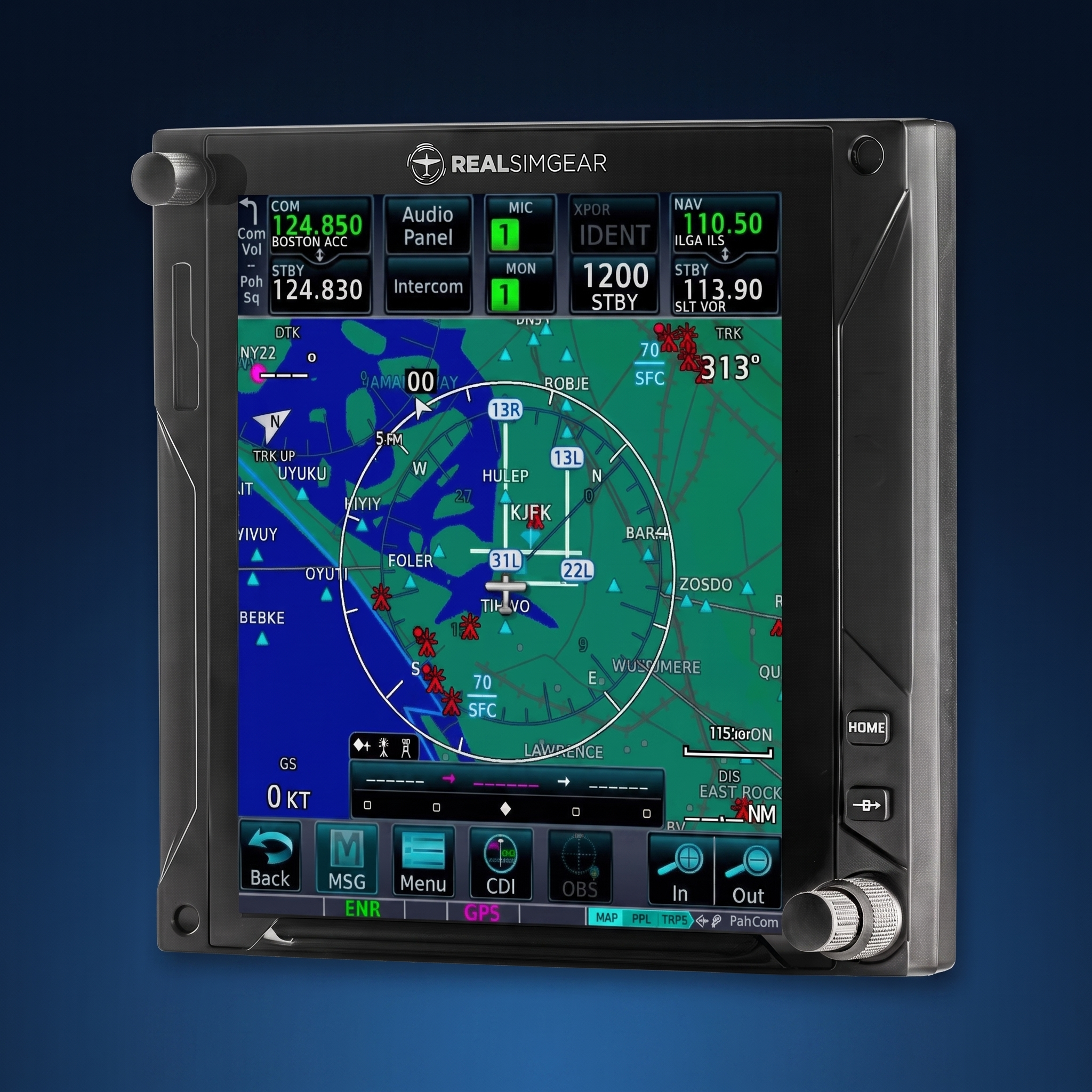
For a long time our GTN750 gave you the right layout and a real touchscreen. The xi goes further. The biggest change is the display: it now matches the exact aspect ratio of the unit in the aircraft, where the older version did not. That sounds minor until you are briefing an approach and the screen in front of you reads the same way the one in the panel does. Nothing to mentally translate.
- →Display matched to the exact aspect ratio of the real GTN750xi
- →Higher-resolution touchscreen that holds up when you zoom into the map or a chart
- →Improved knobs
- →A finger rest faithful to the real GTN750xi, so your hand lands where it expects to
This is the closest thing to the real GTN750xi you can put on your desk. Not a screen pretending to be a navigator. The navigator.
Why use hardware instead of a mouse or a tablet?
You do not build muscle memory with a mouse. The reason to put a GTN750xi on your desk is proficiency. When the weather is down, or you cannot get to the airplane, you can still sit down and run your flows: load the flight plan, set up the approach, work the comm and nav radios, fly the missed. You practice your buttonology until it is automatic, so the next time you do it for real you are not hunting for a soft key.
A tablet can give you a second screen, but it gives you a sheet of glass. The GTN750xi gives you the screen plus the physical knobs, the tactile buttons, and the finger rest. That is the part that transfers to the cockpit. The closer the device is to the one in your panel, the more your practice carries straight back to the airplane.
What you get in the box
The GTN750xi is a touchscreen NAV/COM navigator that connects to your PC over HDMI and USB. It arrives fully assembled and enclosed, ready to mount in your panel or sit on your desk.
- →Full touchscreen NAV/COM interface
- →Connects to your PC over HDMI and USB
- →Fully assembled and enclosed, no building required
- →Panel mount or desktop
- →Measures 158mm by 160mm and sits 22mm in front of the mounting surface
- →Windows PC (not Mac compatible)

The all-new GTN750xi. Fully assembled and ready to mount.
What software do I need to run the GTN750xi?
For the avionics, we recommend TDS Simulations GTNXi for X-Plane 11 and 12, or TDS GTNXi Pro for Microsoft Flight Simulator 2020 and 2024. Pair it with a Navigraph subscription to keep the database current. New to the setup? Our step-by-step MSFS and X-Plane setup guide walks you through it.
Frequently asked questions
Does the GTN750xi work with Microsoft Flight Simulator 2024?
Yes. Use TDS GTNXi Pro, which supports Microsoft Flight Simulator 2020 and 2024. For X-Plane 11 and 12, use TDS Simulations GTNXi.
Is the GTN750xi compatible with Mac?
No. The GTN750xi runs on a Windows PC. MacOS is not supported because of how the unit handles its drivers and display.
How hard is the GTN750xi to set up?
It ships fully assembled and connects to your PC over HDMI and USB. Our help-center guide walks through the setup for both MSFS and X-Plane step by step.
Is a hardware GTN750xi worth it over a tablet?
A tablet gives you a second screen. The GTN750xi gives you the screen plus real knobs, tactile buttons, and a finger rest, which is the part that builds the muscle memory that carries back to the airplane.
The all-new GTN750xi is in stock and ready to ship. Train until it is second nature, then go fly.
Put a real GTN750xi on your desk
The all-new GTN750xi is in stock and shipping now. Bring the panel home.
Shop the GTN750xi Read the setup guide© 2026 RealSimGear. Built for the pilots who train at home.
Share:
Update 5: Jeppesen Worldwide Charts* Synthetic Vision and more!
Introducing the RealSimGear SFx Premier